Showing posts with label Earn Money. Show all posts

Tuesday, 22 July 2014

Get ₹ 50 Free Recharge using WeChat [Official Offer]

WeChat is an instant messaging app just like WhatsApp but with tons of new features. This is the first time (as far as we know) WeChat decided to give their users a surprise gift. WeChat Team have decided to give free recharge of ₹ 50 to all its users.

Get Free Recharge of 50 Rs. using WeChat Android App
   
This is a limited period offer and will last only two days. The offer was started on 22 July 2014 (8:00 am) and will end on 24 July 2014 (at 8:00 pm). So guys hurry up and don't miss this chance to get free recharge.

Update: The Offer has ended. Click Here to View More Offers

How to get free recharge:

Also Read: Earn Free Recharge by Downloading Android Apps from Play Store
  1. Download WeChat app from Play Store. (Click here to download for other OS)
     
     
  2. Register for a new account or login to your old account.
     
  3. [For New Users] Activate and Confirm your account using mobile.
     
  4. Send any message to one of your WeChat friend.
     
  5. In next 4 hours, you will receive a recharge link from WeChat team.
     
  6. Click on Link and fill the required information.
     
  7. Click on submit and you will get your free recharge shortly.
     

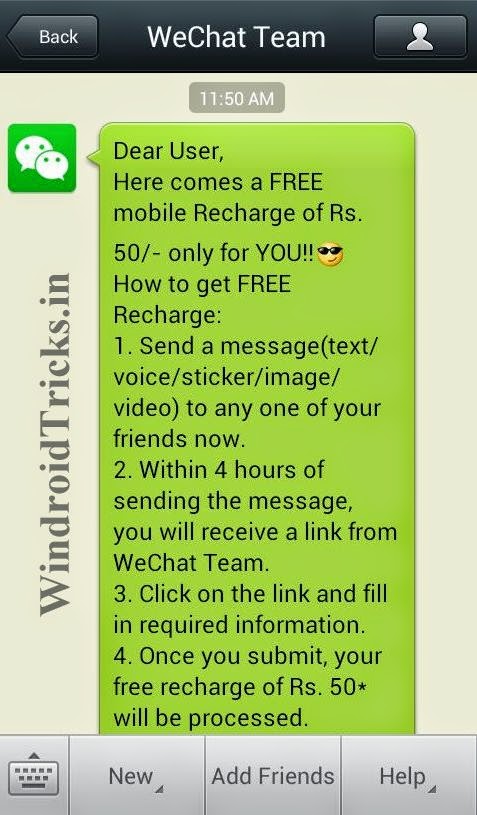
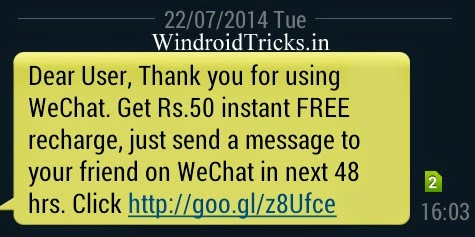
Image Proof: 

50 Rs. Free Recharge using WeChat APP
Message sent to my WeChat ID by WeChat Team.

Get free recharge from WeChat
Message sent to my mobile via WeChat Team (Today @ 4:03PM)
So that's all.. Hope you guys will get your free recharges. If you are having problem using WeChat App or have any questions in mind then you can comment below.

Wednesday, 16 July 2014

Get ₹130 Free Recharge with LINE App [Official Offer]

LINE is an instant messaging app just like WhatsApp. LINE constantly give their new and old users surprise gifts like free recharges and free discount coupons. Last month (June 2014) LINE decided to celebrate holiday season by giving their users free recharge of ₹ 111. Now this time LINE came with a new offer. This time LINE is giving free recharge of ₹ 130 (which is comparatively higher than previous offer) to their new and old customers.

Free Recharge by using LINE App

The offer was started on July 15, 2014 and will end on August 15, 2014. You will need to send at least one sticker each day to one of your friends for 25 Days. The app offer lasts for 30 Days, so even if you miss one or two days in between, you will not have any problem getting recharges.

How to Get ₹ 130 Free Recharge:


  1. Download LINE App if you haven't already. Or Click the button below to download from play store.

    Download LINE App, Free Recharge Tricks
     
  2. [For New Users] Open the app and fill your details and activate your LINE.
     
  3. After Activating start sending some LINE Stickers to your friends. Send at least one Sticker each day to one of your friend.
  4. You will be delighted with your first recharge on 5th day and the process will continue. 
  • This icon will show you how many days are left for your recharge. Click on this Icon to see the schedule of recharges.
Get ₹ 130 Free Recharge with LINE App [Official Offer]Get ₹ 130 Free Recharge with LINE App [Official Offer]

Recharge Days:


  • Day 05 - ₹ 10
  • Day 06 - ₹ 30
  • Day 15 - ₹ 30
  • Day 16 - ₹ 30
  • Day 25 - ₹ 30
Once you have reached the day of your recharge LINE will automatically message you to avail your recharge. The recharge will be directly send to your number or any other number you enter while recharging. 
If you need any further help then comment below. Also tell us what you feel about this offer.

You can subscribe to our newsletter if you want Email Notification for each offer and Tricks.

Sunday, 15 June 2014

Get free Recharge by downloading Android Apps from Play Store

We all like to get free recharges but it is hard to find a genuine website that actually pays you or gives you free recharges. You might have wasted a lot of time searching for these website and trying them all. But it is really disappointing and annoying when you come to know that these sites are fake and will not give you any money that it shows in your dashboard. I have also tried a lot of websites that promises to give free recharge or real money. Many of them was fake and never paid me but I found a website that actually gives you free recharges by downloading android apps.

UPDATE: You will also get recharge for inviting your friends. & You will get extra offers if you install mCent app.

                                       Earn free recharges by downloading Android Apps

How to get free recharge:

  1. Go to mcent.com and Sign up for a new account. (Below offer for first 1000 users)
     
  2. You will have to enter your phone number, password (for mcent log in) and an Email address. *Alternatively you can also use your Facebook ID to log in to mcent directly.
     
  3. Once you have confirmed your mobile number then you can log in to mcent.
     
  4. After log in you will see a bunch of apps that you can download and below those apps you will see how much recharge you will get for downloading the app.
     
  5. Click on the app that you want to download. Read the instruction and then click on Install.
     
  6. You will be redirected to Google Play store to install the app.
     
  7. Now install the app from Play Store and open the app.
     
  8. Go back to mcent to get the credit. Usually it takes 30 Minutes to transfer the credit to your account.


    Earn free recharges by downloading Android Apps    Earn free recharges by downloading Android Apps

Basic Instructions & Proof of Recharges:

Before Installing an App follow these instructions to get credits:
  • Use Google Chrome or Stock browser to complete offers. 
  • Do not complete offers for apps that you have installed previously in any of your android phone using same gmail account.
  • After installing any app open it and use for some seconds. 
  • You can only use mobile to complete offers. 
Proof: I tried this site for about 1 month to check if it is genuine or not. I found it genuine and shared it with you all. See the proof of my recharges in image below:

                                                        Earn free recharges by downloading Android Apps

Do you know any other sites that actually pays? Share it with us also, just comment below. :)

How to create a free blog using Blogger and Earn Money

What is Blogger?

Blogger is a free blog hosting site owned by Google. Blogger.com allows its users to create blog for himself or for a team without spending a single penny. You can create a free blog for anything you like and on any topic. All you need is just some crazy ideas that go viral on internet. So lets start with the tutorial on How you can create a free blog using 'blogger.com'.

                             How to create a free blog using Blogger.com and Earn Money

Tutorial:

Step-1: Creating a Gmail Account:

For creating a blog on blogger.com you need a gmail account. If you already have a Gmail account then you can skip this step and follow step 2. 
  1. Go to gmail.com. 
  2. Fill your details. (Don't use your blogger blog's name as your email id).
    *Fill all the details correctly because these details are important for your adsense account.
  3. Complete the sign up procedure and Activate your gmail id using your Mobile number.
Now you are eligible to create a blogger blog.

Step-2: Creating a Blogger Blog:

  1. Go to blogger.com and login to blogger using your Gmail id.
     
  2. Click on Create blog/New Blog button..

  3. Now a pop-up box will appear(see image below), add the title of your blog (Like Windroid Tricks)

                        How to create a free blog using Blogger.com and Earn Money
     
  4. Now choose a domain name for your blogger blog. Add domain for your blog matching with your blogger title. For eg: If you are creating a blogger blog with title 'Windroid Tricks' then choose a domain name like 'windroidtricks.blogspot.com'
     
  5. Choose a template for your blog. (You can change your template later & you can also upload your own template)
     
  6. Click on 'Create blog' button to create your blog. Now your blog will be created.
      
                                 How to create a free blog using Blogger.com and Earn Money

  7. Click on your blog's name to open dashboard and creating some posts for your blog and share them to social media to gain some traffic.
      
                          How to create a free blog using Blogger.com and Earn Money

Points to remember:


  • In some cases you won't be able to choose a direct domain name like 'windroidtricks.blogspot.com', in that case you have to add some dashes( - ) or numbers in your domain. I suggest you to add dashes because numbers look really unprofessional.
      
  • You can't remove 'blogspot.com' from your domain name because it is a free blog. You can remove 'blogspot.com' from your blogger by buying a top level domain like xyz.com, xyz.in etc. After buying your domain you have to transfer it to your bogger blog. Follow your domain hosting site's procedure to transfer your top level domain to blogger.

Some tips :

  1. Don't loose hope if you are not getting 100's or thousands of page views in a day. It is because you have a new blog and it will take time to become popular.
  2. Write atleast one article in a day.
  3. Add some cool widgets to your blog.
  4. Write original posts and Don't copy posts from other sites. 

Earning Money from free Blogger Blog:

You can earn money from your blog usingadvertising companies like Chitika, Infolinks and the most famous Adsense by Google. 
  • You can apply for chitika and Infolinks after 4-5 weeks of creating your blog and with atleast 25-30 Posts.
     
  • For adsense you have to wait for atleast 6 months if your from India or any other country in Asia and for 3 months if you live outside of Asia. Gettings Adsense approval is a very difficult procedure. You might not get adsense approval in first time but keep applying for it after 1-2 months. You will definately get approved.

Final Words:

Creating a blogger blog is very easy but it is difficult to manage it. You have to give your blog proper time to make it good and popular. If you need any help then you can comment below, I will definitely help you solving your problem.